
 Global (USD)





Dymo S0784440 LabelManager 210D Label Printer with Qwerty English And Arabic Keyboard



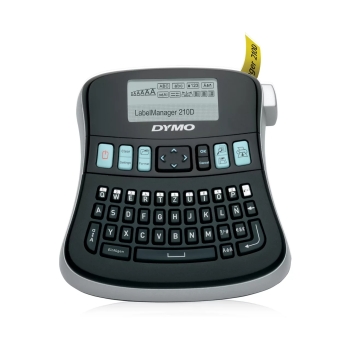
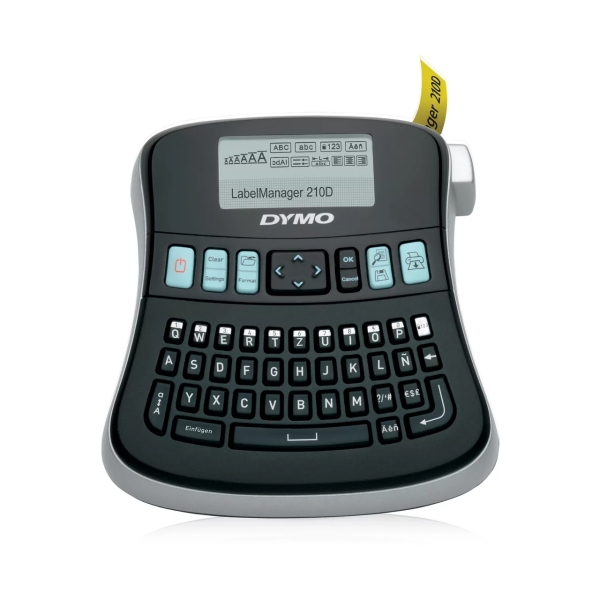
The DYMO LabelManager 210D is a versatile, easy-to-use label printer designed for home, office, and light industrial environments. Its compact form factor and integrated QWERTY keyboard make it intuitive for users familiar with computer-style typing, reducing the learning curve for creating professional-looking labels.
PRODUCT OVERVIEW

Efficient Desktop Labeling Solution
The DYMO LabelManager 210D is a versatile, easy-to-use label printer designed for home, office, and light industrial environments. Its compact form factor and integrated QWERTY keyboard make it intuitive for users familiar with computer-style typing, reducing the learning curve for creating professional-looking labels. A large graphic display shows exactly how the label will appear before printing, eliminating guesswork and improving accuracy in everyday labeling tasks.

Customizable and User-Friendly Operation
This label maker offers a broad range of formatting options that help tailor labels to specific needs. Users can choose from multiple font sizes, text styles, and boxed layouts, as well as access a variety of symbols and punctuation directly via quick-access buttons. The straightforward navigation—from start to print—ensures that even complex labels are easy to create without external software. Battery-powered operation (6 × AA) or an optional AC adapter adds flexibility for both stationary and portable use.

Reliable Performance for Everyday Labeling
Whether organizing files, marking storage bins, or creating signage, the LabelManager 210D supports a range of standard DYMO D1 label tapes (6 mm, 9 mm, and 12 mm widths) that deliver clear, durable results. The printer’s ability to print multiple copies of the same label enhances productivity for repetitive tasks, while its auto power-off feature helps conserve battery life when not in use.
Key Product Features
- Integrated QWERTY keyboard for fast, familiar typing
- Large graphic display shows real-time label layout before printing
- Multiple formatting options: various font sizes, styles, and boxed layouts
- Quick-access symbol and punctuation keys
- Prints on DYMO D1 label tapes in 6 mm, 9 mm, and 12 mm widths
- Print multiple copies of the same label
- Battery or optional AC adapter power
- Auto power-off to conserve energy
| Product Name | Dymo S0784440 LabelManager 210D Label Printer with Qwerty English And Arabic Keyboard |
|---|---|
| Weight | 0.45 Kg |
| Manufacturer | Dymo |
| Color | Black |
| Country of Origin | United States |